
If you want to explore HTML in greater detail, Sams Publishing offers a number of titles that will help you, including Sams Teach Yourself HTML 4 in 24 Hours by Dick Oliver.
Introducing HTML
It wouldn't be appropriate to try to give an exhaustive account of HTML (Hypertext Markup Language)or, indeed, any of the other component technologies of Ajaxwithin this book. Instead we'll review the fundamental principles and give some code examples to illustrate them, paying particular attention to the subjects that will become relevant when we start to develop Ajax applications.
Tip
| If you want to explore HTML in greater detail, Sams Publishing offers a number of titles that will help you, including Sams Teach Yourself HTML 4 in 24 Hours by Dick Oliver. |
What Is HTML?
The World Wide Web is constructed from many millions of individual pages, and those pages are, in general, written in Hypertext Markup Language, better known as HTML.
That name gives away a lot of information about the nature of HTML. We use it to mark up our text documents so that web browsers know how to display them and to define hypertext links within them to provide navigation within or between them.
Anyone who (like me) can remember the old pre-WYSIWYG word processing programs will already be familiar with text markup. Most of these old applications required that special characters be placed at the beginning and end of sections of text that you wanted to be displayed as (for instance) bold, italic, or underlined text.
What Tools Are Needed to Write HTML?
Because the elements used in HTML markup employ only ordinary keyboard characters, all you really need is a good text editor to construct HTML pages. Many are available, and most operating systems have at least one such program already installed. If you're using some version of Windows, for example, the built-in Notepad application works just fine.
Tip
| Although Notepad is a perfectly serviceable text editor, many so-called programmers' editors are available offering useful additional functions such as line numbering and syntax highlighting. Many of these are under open source licences and can be downloaded and used at no cost. It is well worth considering using such an editor, especially for larger or more complex programming tasks. |
Caution
 | Although text editors are ideal for writing program code, the use of word processing software can cause problems due to unwanted markup and other symbols that such programs often embed in the output code. If you choose to use a word processor, make sure that it is capable of saving files as plain ASCII text. |
Our First HTML Document
Let's jump right in and create a simple HTML document. Open Notepad (or whatever editor you've chosen to use) and enter the text shown in Listing 2.1. The HTML markup elements (often referred to as tags) are the character strings enclosed by < and >.
Listing 2.1. testpage.html
<!DOCTYPE HTML PUBLIC "-//W3C//DTD HTML 4.01 Transitional//EN" "http://www.w3.org/TR/html4 |
Now save the document somewhere on your computer, giving it the name testpage.html.
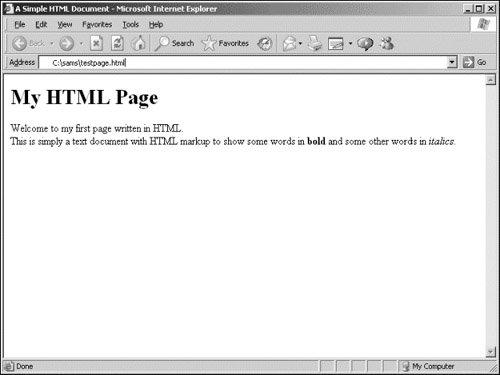
If you now load that page into your favorite browser, such as Internet Explorer or Firefox, you should see something like the window displayed in Figure 2.1.
Figure 2.1. Our test document displayed in Internet Explorer.

![[View full size image]](02fig01_alt.jpg)