
Putting It All Together
Suppose that you want to design a new Ajax application, or update a legacy web application to include Ajax techniques. How do you go about it?
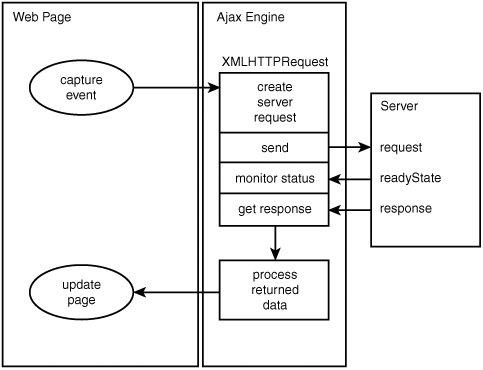
First you need to decide what page events and user actions will be responsible for causing the sending of an asynchronous HTTP request. You may decide, for example, that the onMouseOver event of an image will result in a request being sent to the server to retrieve further information about the subject of the picture; or that the onClick event belonging to a button will generate a server request for information with which to populate the fields on a form.
You saw in Lesson 4, "Client-Side Coding Using JavaScript," how JavaScript can be used to execute instructions on occurrences such as these, by employing event handlers. In your Ajax applications, such methods will be responsible for initiating asynchronous HTTP requests via XMLHTTPRequest.
Having made the request, you need to write routines to monitor the progress of that request until you hear from the server that the request has been successfully completed.
Finally, after receiving notification that the server has completed its task, you need a routine to retrieve the information returned from the server and apply it in the application. You may, for example, want to use the newly returned data to change the contents of the page's body text, populate the fields of a form, or pop open an information window.
Figure 7.5 shows the flow diagram of all this.
Figure 7.5. How the components of an Ajax application work together.
In Lesson 11, "Our First Ajax Application," we'll use what we have learned to construct a complete Ajax application.