
If the XMLHTTPRequest call fails with an error, or has not yet been sent, responseText will have a value null.
The responseText and responseXML Properties
Lesson 9, "Talking with the Server," discussed the server communications that allow you to send and monitor asynchronous server requests. The final piece of the Ajax jigsaw is the information returned by the server in response to a request.
This lesson discusses what forms that information can take, and how you can process it and use it in an application. We will use two of the XMLHTTPRequest object's properties, namely responseText and responseXML.
Table 8.1 listed several properties of the XMLHTTPRequest object that we have yet to describe. Among these are the responseText and responseXML properties.
Lesson 9 discussed how we could use the readyState property of the XMLHTTPRequest object to determine the current status of the XMLHTTPRequest call. By the time our server request has completed, as detected by the condition myRequest.readyState == 4 for our XMLHTTPRequest object myRequest, then the two properties responseText and responseXML will respectively contain text and XML representations of the data returned by the server.
In this lesson you'll see how to access the information contained in these two properties and apply each in an Ajax application.
The responseText Property
The responseText property tries to represent the information returned by the server as a text string.
Tip
| If the XMLHTTPRequest call fails with an error, or has not yet been sent, responseText will have a value null. |
Let's look again at the callback function prototype:
function responseAjax() {
// we are only interested in readyState of 4, i.e. "loaded"
if(myRequest.readyState == 4) {
// if server HTTP response is "OK"
if(myRequest.status == 200) {
... program execution statements ...
} else {
// issue an error message for any other HTTP response
alert("An error occurred: " + myRequest.statusText);
}
}
}
Let's add a program statement to the branch of the if statement that is executed on success, as in Listing 10.1.
Listing 10.1. Displaying the Value of responseText
function responseAjax() { |
In this simple example, our script opens an alert dialog to display the text returned by the server. The line
alert("The server said: " + myRequest.responseText);
takes the text returned by the server-side routine and appends it to the string "The server said: " before presenting it in a JavaScript alert dialog.
Let's look at an example using a simple PHP file on the server:
<?php echo "Hello Ajax caller!"; ?>
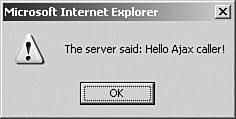
A successful XMLHTTPRequest call to this file would result in the responseText property containing the string Hello Ajax caller!, causing the callback function to produce the dialog shown in Figure 10.1.
Figure 10.1. Output generated by Listing 10.1.
Caution
 | The responseText property is read-only, so there's no point in trying to manipulate its value until that value has first been copied into another variable. |
Because the responseText contains a simple text string, we can manipulate it using any of JavaScript's methods relating to strings. Table 10.1 includes some of the available methods.
Method | Description |
|---|---|
charAt(number) | Selects the single character at the specified position within the string |
indexOf(substring) | Finds the position where the specified substring starts |
lastIndexOf(substring) | Finds the last occurrence of the substring within the string |
substring(start, end) | Gets the specified part of the string |
toLowerCase() | Converts the string to lowercase |
toUpperCase() | Converts the string to uppercase |
We'll be looking at how responseText may be used in real situations in Lesson 12, "Returning Data as Text," and Lesson 13, "AHAHAsynchronous HTML and HTTP."
The responseXML Property
Now suppose that the PHP script we used on the server in the previous example had instead looked like Listing 10.2.
Listing 10.2. A Server-Side Script to Return XML
<?php |
Although this is a short script, it is worthwhile to look at it in some detail.
The first line inside the <?php and ?> delimiters uses PHP's header instruction to add an HTTP header to the returned data.
Caution
| Make sure that your PHP script does not output anythingeven white space characters such as spaces and line returnsprior to issuing a header() instruction; otherwise, an error will occur. |
The header returned is the parameter and value pair
Content-Type: text/xml
which announces to our XMLHTTPRequest object to expect that the following data from the server will be formatted as XML.
The next line is a PHP echo statement that outputs this simple, but complete, XML document:
<?xml version="1.0" ?>
<greeting>
Hello Ajax caller!
</greeting>
Note
 | In PHP you need to escape any quotes that occur within a quoted string to ensure that the meaning of the statement is unambiguous. You do so using a backslash character, hence the PHP command echo "<img src=\"picture.gif\">"; produces the output: <img src="picture.gif"> |
When the server call is completed, we now find this XML document loaded into the responseXML property of our XMLHTTPRequest object.
Tip
| It is important to note that the responseXML property does not contain just a string that forms a text representation of the XML document, as was the case with the responseText property; instead, the entire data and hierarchical structure of the XML document has been stored as a DOM-compatible object. |
We can now access the content of the XML document via JavaScript's DOM methods and properties.