![[View full size image]](12fig01_alt.jpg)
Getting More from the responseText Property
The lessons of Part II, "Introducing Ajax," discussed the individual components that make Ajax work, culminating in a complete Ajax application. In Part III, "More Complex Ajax Technologies," each lesson examines how you can extend what you know to develop more sophisticated Ajax applications.
For this lesson, we'll look a little more closely at the responseText property of the XMLHTTPRequest object and see how we can give our application some extra functionality via its use.
As you have seen in previous lessons, the XMLHTTPRequest object provides two properties that contain information received from the server, namely responseText and responseXML. The former presents the calling application with the server data in string format, whereas the latter provides DOM-compatible XML that can be parsed using JavaScript methods.
Although the responseXML property allows you to carry out some sophisticated programming tasks, much can be achieved just by manipulating the value stored in the responseText property.
Returning Text
The term text is perhaps a little misleading. The responseText property contains a character string, the value of which you can assign to a JavaScript variable via a simple assignment statement:
var mytext = http.responseText;
There is no rule saying that the value contained in such a string must be legible text; in fact, the value can contain complete gibberish provided that the string contains only characters that JavaScript accepts in a string variable.
This fact allows a degree of flexibility in what sorts of information you can transfer using this property.
Using Returned Text Directly in Page Elements
Perhaps the simplest example is to consider the use of the value held in responseText in updating the textual part of a page element, say a <div> container. In this case you may simply take the returned string and apply it to the page element in question.
Here's a simple example. The following is the HTML code for an HTML page that forms the basis for an Ajax application:
<html>
<head>
<title>My Ajax Application</title>
</head>
<body>
Here is the text returned by the server:<br />
<div id="myPageElement"></div>
</body>
</html>
Clearly this is a simple page that, as it stands, would merely output the line "Here is the text returned by the server:" and nothing else.
Now suppose that we add to the page the necessary JavaScript routines to generate an instance of a XMLHTTPRequest object (in this case called http) and make a server request in response to the onLoad() event handler of the page's <body> Element. Listing 12.1 shows the source code for the revised page.
Listing 12.1. A Basic Ajax Application Using the responseText Property
<html> |
Most, and probably all, of this code will be familiar from previous lessons. The part that interests us here is the callback function useHttpResponse(), which contains these lines:
var mytext = http.responseText;
document.getElementById('myPageElement').innerHTML = mytext;
Here we have simply assigned the value received in responseText to become the content of our chosen <div> container.
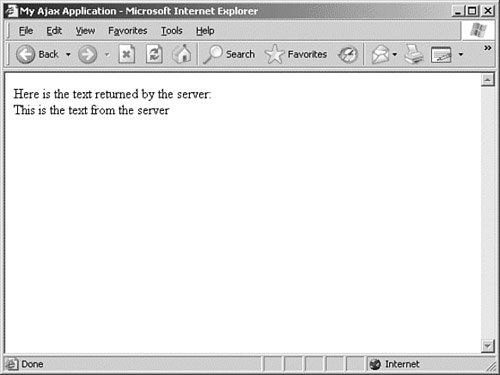
Running the preceding code with the simple server-side script
<?php
echo "This is the text from the server";
?>
produces the screen display of Figure 12.1.
Figure 12.1. Displaying text in a page element via responseText.
Including HTML in responseText
Now let's modify the code from the preceding example.
As you know from previous lessons, HTML markup is entirely composed of tags written using text characters. If the value contained in the responseText property is to be used for modifying the display of the page from which the server request is being sent, there is nothing to stop us having our server script include HTML markup in the information it returns.
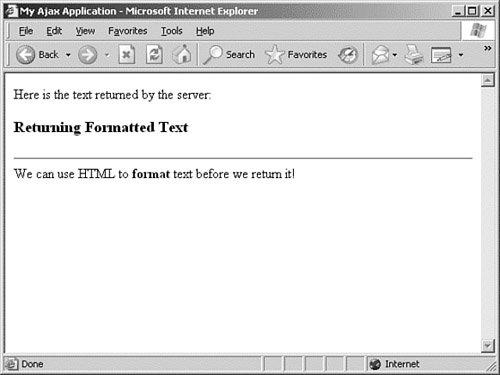
Suppose that we once again use the code of Listing 12.1 but with a modified server script:
<?php
echo "<h3>Returning Formatted Text</h3>";
echo "<hr />";
echo "We can use HTML to <strong>format</strong> text before we return it!";
?>
Figure 12.2 shows the resulting browser display.
Figure 12.2. Display showing HTML formatted at the server.
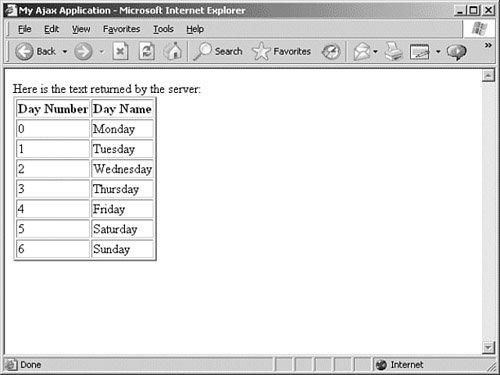
As a slightly more involved example, consider the case where the server script generates more complex output. We want our application to take this server output and display it as the contents of a table.
This time we'll use our server-side PHP script to generate some tabular information:
<?php
$days = array('Monday','Tuesday','Wednesday','Thursday','Friday','Saturday','Sunday');
echo "<table border='2'>";
echo "<tr><th>Day Number</th><th>Day Name</th></tr>";
for($i=0;$i<7;$i++)
{
echo "<tr><td>".$i."</td><td>".$days[$i]."</td></tr>";
}
echo "</table>";
?>
Once again using the code of Listing 12.1 to call the server-side script via XMLHTTPRequest, we obtain a page as displayed in Figure 12.3.
Figure 12.3. Returning more complex HTML.
More Complex Formatted Data
So far we have demonstrated ways to return text that may be directly applied to an element on a web page. So far, so good. However, if you are willing to do a little more work in JavaScript to manipulate the returned data, you can achieve even more.
Provided that the server returns a string value in the responseText property of the XMLHTTPRequest object, you can use any data format you may devise to encode information within it.
Consider the following server-side script, which uses the same data array as in the previous example:
<?php
$days = array('Monday','Tuesday','Wednesday','Thursday','Friday','Saturday','Sunday');
$numdays = sizeof($days);
for($i=0;$i<($numdays - 1);$i++)
{
echo $days[$i]."|";
}
echo $days[$numdays-1];
?>
Note
 | Note the use of the PHP sizeof() function to determine the number of items in the array. In PHP, as in JavaScript, array keys are numbered from 0 rather than 1. |
The string returned in the responseText property now contains the days of the week, separatedor delimitedby the pipe character |. If we copy this string into a JavaScript variable mystring,
var mystring = http.responseText;
we will find that the variable mystring contains the string
Monday|Tuesday|Wednesday|Thursday|Friday|Saturday|Sunday
We may now conveniently divide this string into an array using JavaScript's split() method:
var results = http.responseText.split("|");
Tip
 | The JavaScript split() method slices up a string, making each cut wherever in the string it locates the character that it has been given as an argument. That character need not be a pipe; popular alternatives are commas or slashes. |
We now have a JavaScript array results containing our data:
results[0] = 'Monday'
results[1] = 'Tuesday'
etc...
Rather than simply displaying the received data, we now can use it in JavaScript routines in any way we want.
Tip
| For complex data formats, XML may be a better way to receive and handle data from the server. However, it is remarkable how much can be done just by using the responseText property. |
![[View full size image]](12fig02_alt.jpg)
![[View full size image]](12fig03_alt.jpg)