ProjectAn RSS Headline Reader
Let's now take what we've learned about returning XML data from the server and use these techniques to tackle a new project.
XML data is made available on the Internet in many forms. One of the most popular is the RSS feed, a particular type of XML source usually containing news or other topical and regularly updated items. RSS feeds are available from many sources on the Web, including most broadcast companies and newspaper publishers, as well as specialist sites for all manner of subjects.
We'll write an Ajax application to take a URL for an RSS feed, collect the XML, and list the titles and descriptions of the news items contained in the feed.
The following is part of the XML for a typical RSS feed:
[View full width]
<rss version="0.91">
<channel>
<title>myRSSfeed.com</title>
<link>http://www.********.com/</link>
<description>My RSS feed</description>
<language>en-us</language>
<item>
<title>New Store Opens</title>
<link>http://www.**********.html</link>
<description>A new music store opened today in Canal Road. The new business, Ajax Records,
 caters for a wide range of musical tastes.</description>
</item>
<item>
<title>Bad Weather Affects Transport</title>
<link>http://www.***********.html</link>
<description>Trains and buses were disrupted badly today due to sudden heavy snow. Police
advised people not to travel unless absolutely necessary.</description>
</item>
<item>
<title>Date Announced for Mayoral Election</title>
<link>http://www.*********.html</link>
<description>September 4th has been announced as the date for the next mayoral election.
Watch local news for more details.</description>
</item>
</channel>
</rss>
From the first line
<rss version="0.91">
we see that we are dealing with RSS version 0.91 in this case. The versions of RSS differ quite a bit, but for the purposes of our example we only care about the <title>, <link>, and <description> elements for the individual news items, which remain essentially unchanged from version to version.
The HTML Page for Our Application
Our page needs to contain an input field for us to enter the URL of the required RSS feed and a button to instruct the application to collect the data. We also will have a <div> container in which to display our parsed data:
[View full width]
<html>
<head>
<title>An Ajax RSS Headline Reader</title>
</head>
<body>
<h3>An Ajax RSS Reader</h3>
<form name="form1">
URL of RSS feed: <input type="text" name="feed" size="50" value="http://"><input
type="button" value="Get Feed">
<br/ ><br />
<div id="news"><h4>Feed Titles</h4></div>
</form>
</html>
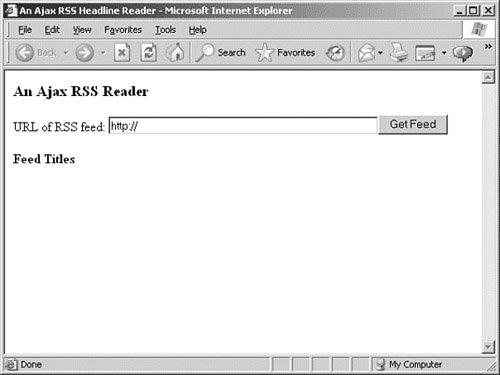
If we save this code to a file rss.htm and load it into our browser, we see something like the display shown in Figure 14.2.
Figure 14.2. Displaying the base HTML document for our RSS headline reader.
[View full size image]
Much of the code for our reader will be familiar by now; the means of creating an instance of the XMLHTTPRequest object, constructing and sending a server request, and checking when that request has been completed are all carried out much as in previous examples.
This time, however, instead of using responseText we will be receiving data in XML via the responseXML property. We'll use that data to modify the DOM of our HTML page to show the news items' titles and descriptions in a list within the page's <div> container. Each title and description will be contained in its own paragraph element (which we'll also construct for the purpose) and be styled via a style sheet to display as we want.
The Code in Full
Let's jump right in and look at the code, shown in Listing 14.1.
Listing 14.1. Ajax RSS Headline Reader
[View full width] <html>
<head>
<title>An Ajax RSS Headline Reader</title>
</head>
<style>
.title {
font: 16px bold helvetica, arial, sans-serif;
padding: 0px 30px 0px 30px;
text-decoration:underline;
}
.descrip {
font: 14px normal helvetica, arial, sans-serif;
text-decoration:italic;
padding: 0px 30px 0px 30px;
background-color:#cccccc;
}
.link {
font: 9px bold helvetica, arial, sans-serif;
padding: 0px 30px 0px 30px;
}
.displaybox {
border: 1px solid black;
padding: 0px 50px 0px 50px;
}
</style>
<script language="JavaScript" type="text/javascript">
function getXMLHTTPRequest() {
try {
req = new XMLHttpRequest(); /* e.g. Firefox */
} catch(e) {
try {
req = new ActiveXObject("Msxml2.XMLHTTP");
/* some versions IE */
} catch (e) {
try {
req = new ActiveXObject("Microsoft.XMLHTTP");
/* some versions IE */
} catch (E) {
req = false;
}
}
}
return req;
}
var http = getXMLHTTPRequest();
function getRSS() {
var myurl = 'rssproxy.php?feed=';
var myfeed = document.form1.feed.value;
myRand = parseInt(Math.random()*999999999999999);
// cache buster
var modurl = myurl+escape(myfeed)+"&rand="+myRand;
http.open("GET", modurl, true);
http.onreadystatechange = useHttpResponse;
http.send(null);
}
function useHttpResponse() {
if (http.readyState == 4) {
if(http.status == 200) {
// first remove the childnodes
// presently in the DM
while (document.getElementById('news') .hasChildNodes())
{
document.getElementById('news').removeChild(document .getElementById('news').firstChild);
}
var titleNodes = http.responseXML .getElementsByTagName("title");
var descriptionNodes = http.responseXML .getElementsByTagName("description");
var linkNodes = http.responseXML .getElementsByTagName("link");
for(var i =1;i<titleNodes.length;i++)
{
var newtext = document .createTextNode(titleNodes[i] .childNodes[0].nodeValue);
var newpara = document.createElement('p');
var para = document.getElementById('news') .appendChild(newpara);
newpara.appendChild(newtext);
newpara.className = "title";
var newtext2 = document .createTextNode(descriptionNodes[i] .childNodes[0].nodeValue);
var newpara2 = document.createElement('p');
var para2 = document .getElementById('news').appendChild(newpara2);
newpara2.appendChild(newtext2);
newpara2.className = "descrip";
var newtext3 = document .createTextNode(linkNodes[i] .childNodes[0].nodeValue);
var newpara3 = document.createElement('p');
var para3 = document.getElementById('news') .appendChild(newpara3);
newpara3.appendChild(newtext3);
newpara3.className = "link";
}
}
}
}
</script>
<body>
<center>
<h3>An Ajax RSS Reader</h3>
<form name="form1">
URL of RSS feed: <input type="text" name="feed" size="50" value="http://"><input
type="button" onClick="getRSS()" value="Get Feed"><br><br>
<div id="news" class="displaybox"> <h4>Feed Titles</h4></div>
</form>
</center>
</html>
|
Mostly we are concerned with describing the workings of the callback function useHttpResponse().
The Callback Function
In addition to the usual duties of checking the XMLHTTPRequest readyState and status properties, this function undertakes for us the following tasks:
Remove from the display <div> any display elements from previous RSS listings.
Parse the incoming XML to extract the title, link, and description elements.
Construct DOM elements to hold and display these results.
Apply CSS styles to these elements to change how they are displayed in the browser.
To remove the DOM elements installed by previous news imports (where they exist), we first identify the <div> element by using its ID and then use the hasChildNodes() DOM method, looping through and deleting the first child node from the <div> element each time until none remain:
while (document.getElementById('news').hasChildNodes())
{
document.getElementById('news') .removeChild(document.getElementById('news').firstChild);
}
The following explanation describes the processing of the title elements, but, as can be seen from Listing 14.1, we repeat the process identically to retrieve the description and link information too.
To parse the XML content to extract the item titles, we build an array titleNodes from the XML data stored in responseXML:
var titleNodes = http.responseXML.getElementsByTagName("title");
We can then loop through these items, processing each in turn:
for(var i =1;i<titleNodes.length;i++)
{ ... processing instructions ... }
For each title, we need to first extract the title text using the nodeValue property:
var newtext = document.createTextNode(titleNodes[i] .childNodes[0].nodeValue);
We can then create a paragraph element:
var newpara = document.createElement('p');
append the paragraph as a child node of the <div> element:
var para = document.getElementById('news') .appendChild(newpara);
and apply the text content to the paragraph element:
newpara.appendChild(newtext);
Finally, using the className property we can define how the paragraph is displayed. The class declarations appear in a <style> element in the document head and provide a convenient means of changing the look of the RSS reader to suit our needs.
newpara.className = "title";
Each time we enter the URL of a different RSS feed into the input field and click the button, the <div> content is updated to show the items belonging to the new RSS feed. This being an Ajax application, there is of course no need to reload the whole page.
The Server-Side Code
Because of the security constraints built into the XMLHTTPRequest object, we can't call an RSS feed directly; we must use a script having a URL on our own server, and have this script collect the remote XML file and deliver it to the Ajax application.
In this case, we do not require that the server-side script rssproxy.php should modify the XML file but simply route it back to us via the responseXML property of the XMLHTTPRequest object. We say that the script is acting as a proxy because it is retrieving the remote resource on behalf of the Ajax application.
Listing 14.2 shows the code of the PHP script.
Listing 14.2. Server Script for the RSS Headline Reader
<?php
$mysession = curl_init($_GET['feed']);
curl_setopt($mysession, CURLOPT_HEADER, false);
curl_setopt($mysession, CURLOPT_RETURNTRANSFER, true);
$out = curl_exec($mysession);
header("Content-Type: text/xml");
echo $out;
curl_close($mysession);
?>
|
The script uses the cURL PHP library, a set of routines for making Internet file transfer easier to program. A full description of cURL would not be appropriate here; suffice to say that this short script first receives the URL of the required RSS feed by referring to the feed variable sent by the Ajax application. The two lines that call the curl_setopt() function declare, respectively, that we don't want the headers sent with the remote file, but we do want the file contents. The curl_exec() function then makes the data transfer.
After that it's simply a matter of adding an appropriate header by using the familiar PHP header() command and returning the data to our Ajax application.
Tip
 | For a full description of using cURL with PHP, see the PHP website at http://uk2.php.net/curl and/or the cURL site at http://curl.haxx.se/. |
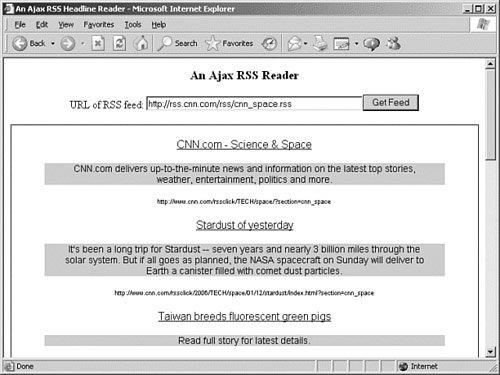
Figure 14.3 shows the RSS reader in action, in this case displaying content from a CNN newsfeed.
Figure 14.3. The Ajax RSS reader in action.
[View full size image]
![[View full size image]](14fig02_alt.jpg)
![[View full size image]](14fig03_alt.jpg)