Rico's Other Interface Tools
Rico's capabilities aren't limited to aiding the development of Ajax applications. Let's now look at some other capabilities you can add to your user interfaces using the Rico toolkit. Although these techniques do not themselves use Ajax, it takes little imagination to realize what they might achieve when combined with Rico's Ajax tools.
Drag-and-Drop
Both desktop applications and the operating systems on which they run make widespread use of drag-and-drop to simplify the user interface. The JavaScript techniques required to implement drag-and-drop can be tricky to master, not least because of the many cross-browser issues that arise.
Drag-and-drop using Rico, however, is simple.
Including the rico.js file in your application automatically causes the creation of an object called dndMgr, Rico's Drag and Drop Manager. Using the dndMgr object is much like using AjaxEngine; this time, though, we need to register not Ajax requests and responses, but draggable items and drop zones (page elements that can receive dragged items).
These tasks are carried out via the registerDraggable and registerDropZone methods:
dndMgr.registerDraggable( new Rico.Draggable('test', 'dragElementID') );
dndMgr.registerDropZone( new Rico.Dropzone('dropElementID') );
These two simple commands declare, respectively, a page element with ID dragElementID as being draggable, and another element with ID dropElementID as a drop zone. The argument 'test' of the registerDraggable() method defines a type for the draggable item, which can be tested and used by subsequent code, if required.
Example of a Drag-and-Drop Interface
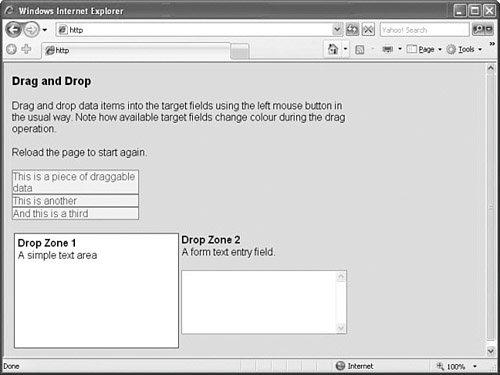
Listing 20.3 shows how simple it is to implement drag-and-drop using Rico. The displayed HTML page is shown in Figure 20.2.
Figure 20.2. The simple drag-and-drop application.
Listing 20.3. Simple Drag-and-Drop Using Rico
<!DOCTYPE HTML PUBLIC "-//W3C//DTD HTML 4.01 Transitional//EN" "http://www.w3.org/TR/html4 |
The two JavaScript libraries rico.js and prototype.js are included in the <head> of the document along with style definitions for various page elements.
Note that two page elements in particular, a <div> container and a <textarea> input field, have been given IDs of dropzone1 and dropzone2. Further down the listing, these two elements are defined as drop zones for our drag-and-drop operations by the lines
dndMgr.registerDropZone( new Rico.Dropzone('droponme') );
dndMgr.registerDropZone( new Rico.Dropzone('droponme2') );
You'll see too that three small <div> containers have been defined in the page and given IDs of draggable1, draggable2, and draggable3. As you have no doubt guessed, they are to become draggable page elements and are defined as such by the following code lines:
dndMgr.registerDraggable( new Rico.Draggable('foo','draggable1') );
dndMgr.registerDraggable( new Rico.Draggable('foo','draggable2') );
dndMgr.registerDraggable( new Rico.Draggable('foo','draggable3') );
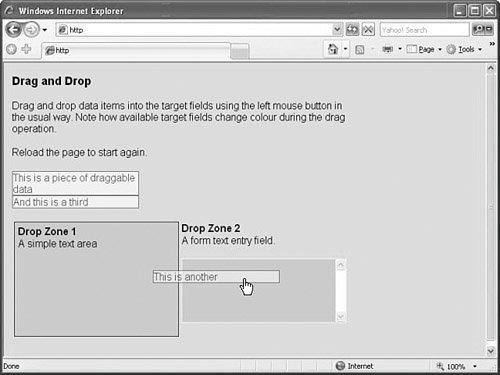
That's all there is to it! Rico takes care of all the details, even changing the look of the available drop zones while something is being dragged, as shown in Figure 20.3.
Figure 20.3. Drop zones highlighted during drag operation.
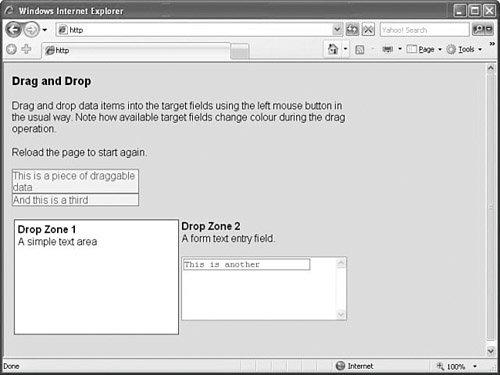
When released above an available drop zone, draggable items position themselves inline with the HTML code of the drop zone element, as can be seen in Figure 20.4.
Figure 20.4. After completing the drag-and-drop.
Cinematic Effects
In addition to Ajax and drag-and-drop tools, Rico also makes available a host of user interface gadgets known collectively as cinematic effects.
Note
 | Rico's cinematic effects are extensions to the Effect class found in prototype.js. |
These effects include animation of page elements (changing their sizes and/or shapes), fading effects (altering the opacity of page elements), applying rounded corners to objects, and manipulating object colors.
Used alongside the interface techniques previously discussed, these effects can help you to build sophisticated, eye-catching, and user-friendly interfaces much more reminiscent of desktop applications than of web pages.

![[View full size image]](20fig02_alt.jpg)
![[View full size image]](20fig03_alt.jpg)
![[View full size image]](20fig04_alt.jpg)