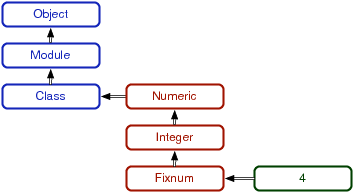
Figure 1. Ruby metamodel
At the time, one of the most striking scenes in Mary Poppins was her entrance. She floated into town on her umbrella. My kids will never understand why that entrance was groundbreaking stuff. Today, you’re going to experience a little bit of the magic that makes Ruby click. You’ll learn to use the basic building blocks of objects, collections, and classes. You’ll also learn the basics of the code block. Open up your mind to a little magic.
Unlike Java and C#, you don’t have to build a whole class to define a function. You can define a function right in the console:
>> def tell_the_truth
|
|
>> true
|
|
>> end
|
Every function returns something. If you do not specify an explicit return, the function will return the value of the last expression that’s processed before exiting. Like everything else, this function is an object. Later, we’ll work on strategies to pass functions as parameters to other functions.
Arrays are Ruby’s workhorse ordered collection. Ruby 1.9 introduces ordered hashes too, but in general, arrays are Ruby’s primary ordered collection. Take a look:
>> animals = ['lions', 'tigers', 'bears']
|
|
=> ["lions", "tigers", "bears"]
|
|
>> puts animals
|
|
lions
|
|
tigers
|
|
bears
|
|
=> nil
|
|
>> animals[0]
|
|
=> "lions"
|
|
>> animals[2]
|
|
=> "bears"
|
|
>> animals[10]
|
|
=> nil
|
|
>> animals[-1]
|
|
=> "bears"
|
|
>> animals[-2]
|
|
=> "tigers"
|
|
>> animals[0..1]
|
|
=> ['lions', 'tigers']
|
|
>> (0..1).class
|
|
=> Range
|
You can see that Ruby collections will give you some freedom. If you access any undefined array element, Ruby will simply return nil. You will also find some features that don’t make arrays more powerful but just make them easier to use. animals[-1] returned the first element from the end, animals[-2] returned the second, and so on. These features are called syntactic sugar, an added feature for convenience. The animals[0..1] expression might look like syntactic sugar, but it’s not. 0..1 is actually a Range, meaning all numbers from 0 to 1, inclusive.
Arrays can hold other types as well:
>> a[0] = 0
|
|
NameError: undefined local variable or method `a' for main:Object
|
|
from (irb):23
|
|
>> a = []
|
|
=> []
|
Oops. I tried to use an array before it was an array. That error gives you a clue to the way Ruby arrays and hashes work. [] is actually a method on Array:
>> [1].class
|
|
=> Array
|
|
>> [1].methods.include?('[]')
|
|
=> true
|
|
>>
# use [1].methods.include?(:[]) on ruby 1.9
|
So, [] and []= are just syntactic sugar to allow access to an array. To do this right, I need to put an empty array into it first, and then I can play around with it some:
>> a[0] = 'zero'
|
|
=> "zero"
|
|
>> a[1] = 1
|
|
=> 1
|
|
>> a[2] = ['two', 'things']
|
|
=> ["two", "things"]
|
|
>> a
|
|
=> ["zero", 1, ["two", "things"]]
|
Arrays don’t need to be homogeneous.
>> a = [[1, 2, 3], [10, 20, 30], [40, 50, 60]]
|
|
=> [[1, 2, 3], [10, 20, 30], [40, 50, 60]]
|
|
>> a[0][0]
|
|
=> 1
|
|
>> a[1][2]
|
|
=> 30
|
And multidimensional arrays are just arrays of arrays.
>> a = [1]
|
|
=> [1]
|
|
>> a.push(1)
|
|
=> [1, 1]
|
|
>> a = [1]
|
|
=> [1]
|
|
>> a.push(2)
|
|
=> [1, 2]
|
|
>> a.pop
|
|
=> 2
|
|
>> a.pop
|
|
=> 1
|
Arrays have an incredibly rich API. You can use an array as a queue, a linked list, a stack, or a set. Now, let’s take a look at the other major collection in Ruby, the hash.
Remember that collections are buckets for objects. In the hash bucket, every object has a label. The label is the key, and the object is the value. A hash is a bunch of key-value pairs:
>> numbers = {1 => 'one', 2 => 'two'}
|
|
=> {1=>"one", 2=>"two"}
|
|
>> numbers[1]
|
|
=> "one"
|
|
>> numbers[2]
|
|
=> "two"
|
|
>> stuff = {:array => [1, 2, 3], :string => 'Hi, mom!'}
|
|
=> {:array=>[1, 2, 3], :string=>"Hi, mom!"}
|
|
>> stuff[:string]
|
|
=> "Hi, mom!"
|
This is not too complicated. A hash works a lot like an array, but instead of an integer index, the hash can have any arbitrary key. The last hash is interesting because I’m introducing a symbol for the first time. A symbol is an identifier preceded with a colon, like :symbol. Symbols are great for naming things or ideas. Although two strings with the same value can be different physical strings, identical symbols are the same physical object. You can tell by getting the unique object identifier of the symbol several times, like so:
>> 'string'.object_id
|
|
=> 3092010
|
|
>> 'string'.object_id
|
|
=> 3089690
|
|
>> :string.object_id
|
|
=> 69618
|
|
>> :string.object_id
|
|
=> 69618
|
Hashes sometimes show up in unusual circumstances. For example, Ruby does not support named parameters, but you can simulate them with a hash. Throw in a little syntactic sugar, and you can get some interesting behavior:
>> def tell_the_truth(options={})
|
|
>> if options[:profession] == :lawyer
|
|
>> 'it could be believed that this is almost certainly not false.'
|
|
>> else
|
|
>> true
|
|
>> end
|
|
>> end
|
|
=> nil
|
|
>> tell_the_truth
|
|
=> true
|
|
>> tell_the_truth( :profession => :lawyer )
|
|
=> "it could be believed that this is almost certainly not false."
|
This method takes a single optional parameter. If you pass nothing in, options will be set to an empty hash. If you pass in a :profession of :lawyer, you will get something different. The result is not fully true, but it is almost just as good, because the system will evaluate it as true. Notice that you didn’t have to type in the braces. These braces are optional for the last parameter of a function. Since array elements, hash keys, and hash values can be almost anything, you can build some incredibly sophisticated data structures in Ruby, but the real power comes when you start to get into code blocks.
A code block is a function without a name. You can pass it as a parameter to a function or a method. For example:
>> 3.times {puts 'hiya there, kiddo'}
|
|
hiya there, kiddo
|
|
hiya there, kiddo
|
|
hiya there, kiddo
|
The code between braces is called a code block. times is a method on Fixnum that simply does something some number of times, where something is a code block and number is the value of the Fixnum. You can specify code blocks with {/} or do/end. The typical Ruby convention is to use braces when your code block is on one line and use the do/end form when the code blocks span more than one line. Code blocks can take one or more parameters:
>> animals = ['lions and ', 'tigers and', 'bears', 'oh my']
|
|
=> ["lions and ", "tigers and", "bears", "oh my"]
|
|
>> animals.each {|a| puts a}
|
|
lions and
|
|
tigers and
|
|
bears
|
|
oh my
|
This code begins to display the power of the code block. That code told Ruby what to do for every item in the collection. With a fraction of the syntax, Ruby iterated over each of the elements, printing each one. To really get a feel for what’s going on, here’s a custom implementation of the times method:
>> class Fixnum
|
|
>> def my_times
|
|
>> i = self
|
|
>> while i > 0
|
|
>> i = i - 1
|
|
>> yield
|
|
>> end
|
|
>> end
|
|
>> end
|
|
=> nil
|
|
>> 3.my_times {puts 'mangy moose'}
|
|
mangy moose
|
|
mangy moose
|
|
mangy moose
|
This code opens up an existing class and adds a method. In this case, the method called my_times loops a set number of times, invoking the code block with yield. Blocks can also be first-class parameters. Check out this example:
>> def call_block(&block)
|
|
>> block.call
|
|
>> end
|
|
=> nil
|
|
>> def pass_block(&block)
|
|
>> call_block(&block)
|
|
>> end
|
|
=> nil
|
|
>> pass_block {puts 'Hello, block'}
|
|
Hello, block
|
This technique will let you pass around executable code. Blocks aren’t just for iteration. In Ruby, you’ll use blocks to delay execution...
execute_at_noon { puts 'Beep beep... time to get up'}
|
conditionally execute something...
...some code...
|
|
in_case_of_emergency do
|
|
use_credit_card
|
|
panic
|
|
end
|
|
|
|
def in_case_of_emergency
|
|
yield if emergency?
|
|
end
|
|
...more code...
|
enforce policy...
within_a_transaction do
|
|
things_that
|
|
must_happen_together
|
|
end
|
|
|
|
def within_a_transaction
|
|
begin_transaction
|
|
yield
|
|
end_transaction
|
|
end
|
and many other places. You’ll see Ruby libraries that use blocks to process each line of a file, do work within an HTTP transaction, and do complex operations over collections. Ruby is a block party.
The code examples are getting a little more complicated, so working from the interactive console isn’t all that convenient anymore. You’ll use the console to explore short bits of code, but you’ll primarily put your code into files. Create a file called hello.rb. You can include any Ruby code that you’d like:
puts 'hello, world'
|
Save it to your current directory, and then execute it from the command line:
batate$ ruby hello.rb
|
|
hello, world
|
A few people are using Ruby from full integrated development environments, but many are happy to use a simple editor with files. My favorite is TextMate, but vi, emacs, and many other popular editors have Ruby plug-ins. With this understanding in our back pocket, we can move on to the reusable building blocks of Ruby programs.
Like Java, C#, and C++, Ruby has classes and objects. Think cookie cutter and cookie—classes are templates for objects. Of course, Ruby supports inheritance. Unlike C++, a Ruby class can inherit from only one parent, called a superclass. To see it all in action, from the console, type the following:
>> 4.class
|
|
=> Fixnum
|
|
>> 4.class.superclass
|
|
=> Integer
|
|
>> 4.class.superclass.superclass
|
|
=> Numeric
|
|
>> 4.class.superclass.superclass.superclass
|
|
=> Object
|
|
>> 4.class.superclass.superclass.superclass.superclass
|
|
=> nil
|
So far, so good. Objects are derived from a class. The 4’s class is Fixnum, which inherits from Integer, Numeric, and ultimately Object.
Check out Figure 1, Ruby metamodel to see how things fit together. Everything eventually inherits from Object. A Class is also a Module. Instances of Class serve as templates for objects. In our case, Fixnum is an instance of a class, and 4 is an instance of Fixnum. Each of these classes is also an object:
|
|
|
Figure 1. Ruby metamodel |
>> 4.class.class
|
|
=> Class
|
|
>> 4.class.class.superclass
|
|
=> Module
|
|
>> 4.class.class.superclass.superclass
|
|
=> Object
|
So, Fixnum is derived from the class Class. From there, it really gets confusing. Class inherits from Module, and Module inherits from Object. When all is said and done, everything in Ruby has a common ancestor, Object.
| ruby/tree.rb | |
class Tree
|
|
attr_accessor :children, :node_name
|
|
|
|
def initialize(name, children=[])
|
|
@children = children
|
|
@node_name = name
|
|
end
|
|
|
|
def visit_all(&block)
|
|
visit &block
|
|
children.each {|c| c.visit_all &block}
|
|
end
|
|
|
|
def visit(&block)
|
|
block.call self
|
|
end
|
|
end
|
|
|
|
ruby_tree = Tree.new( "Ruby",
|
|
[Tree.new("Reia"),
|
|
Tree.new("MacRuby")] )
|
|
|
|
puts "Visiting a node"
|
|
ruby_tree.visit {|node| puts node.node_name}
|
|
puts
|
|
|
|
puts "visiting entire tree"
|
|
ruby_tree.visit_all {|node| puts node.node_name}
|
|
This power-packed class implements a very simple tree. It has three methods, initialize, visit, and visit_all, and two instance variables, children and node_name. initialize has special meaning. Ruby will call it when the class instantiates a new object.
I should point out a few conventions and rules for Ruby. Classes start with capital letters and typically use CamelCase to denote capitalization. You must prepend instance variables (one value per object) with @ and class variables (one value per class) with @@. Instance variables and method names begin with lowercase letters in the underscore_style. Constants are in ALL_CAPS. This code defines a tree class. Each tree has two instance variables: @children and @node_name. Functions and methods that test typically use a question mark (if test?).
The attr keyword defines an instance variable. Several versions exist. The most common are attr (defining an instance variable and a method of the same name to access it) and attr_accessor, defining an instance variable, an accessor, and a setter.
Our dense program packs a punch. It uses blocks and recursion to allow any user to visit all nodes in a tree. Each instance of Tree has one node of a tree. The initialize method provides the starting values for children and node_name. The visit method calls the inbound code block. The visit_all method calls visit for the node and then recursively calls visit_all for each of the children.
The remaining code uses the API. It defines a tree, visits one node, and then visits all nodes. Running it produces this output:
Visiting a node
|
|
Ruby
|
|
|
|
visiting entire tree
|
|
Ruby
|
|
Reia
|
|
MacRuby
|
Classes are only part of the equation. You’ve briefly seen modules in . Let’s go back and take a closer look.
Object-oriented languages use inheritance to propagate behavior to similar objects. When the behaviors are not similar, either you can allow inheritance from more than one class (multiple inheritance) or you can look to another solution. Experience has shown that multiple inheritance is complicated and problematic. Java uses interfaces to solve this problem. Ruby uses modules. A module is a collection of functions and constants. When you include a module as part of a class, those behaviors and constants become part of the class.
Take this class, which adds a to_f method to an arbitrary class:
| ruby/to_file.rb | |
module ToFile
|
|
def filename
|
|
"object_#{self.object_id}.txt"
|
|
end
|
|
def to_f
|
|
File.open(filename, 'w') {|f| f.write(to_s)}
|
|
end
|
|
end
|
|
|
|
class Person
|
|
include ToFile
|
|
attr_accessor :name
|
|
|
|
def initialize(name)
|
|
@name = name
|
|
end
|
|
def to_s
|
|
name
|
|
end
|
|
end
|
|
|
|
Person.new('matz').to_f
|
|
Start with the module definition. This module has two methods. The to_f method writes the output of the to_s method to a file with a filename supplied by the filename method. What’s interesting here is that to_s is used in the module but implemented in the class! The class has not even been defined yet. The module interacts with the including class at an intimate level. The module will often depend on several class methods. With Java, this contract is explicit: the class will implement a formal interface. With Ruby, this contract is implicit, through duck typing.
The details of Person are not at all interesting, and that’s the point. The Person includes the module, and we’re done. The ability to write to a file has nothing to do with whether a class is actually a Person. We add the capability to add the contents to a file by mixing in the capability. We can add new mixins and subclasses to Person, and each subclass will have the capabilities of all the mixins without having to know about the mixin’s implementation. When all is said and done, you can use a simplified single inheritance to define the essence of a class and then attach additional capabilities with modules. This style of programming, introduced in Flavors and used in many languages from Smalltalk to Python, is called a mixin. The vehicle that carries the mixin is not always called a module, but the premise is clear. Single inheritance plus mixins allow for a nice packaging of behavior.
A couple of the most critical mixins in Ruby are the enumerable and comparable mixins. A class wanting to be enumerable must implement each, and a class wanting to be comparable must implement <=>. Called the spaceship operator, a <=> b is a simple comparison that returns -1 if b is greater, 1 if a is greater, and 0 otherwise. In exchange for implementing these methods, enumerable and comparable provide many convenience methods for collections. Crack open the console:
>> 'begin' <=> 'end'
|
|
=> -1
|
|
>> 'same' <=> 'same'
|
|
=> 0
|
|
>> a = [5, 3, 4, 1]
|
|
=> [5, 3, 4, 1]
|
|
>> a.sort
|
|
=> [1, 3, 4, 5]
|
|
>> a.any? {|i| i > 6}
|
|
=> false
|
|
>> a.any? {|i| i > 4}
|
|
=> true
|
|
>> a.all? {|i| i > 4}
|
|
=> false
|
|
>> a.all? {|i| i > 0}
|
|
=> true
|
|
>> a.collect {|i| i * 2}
|
|
=> [10, 6, 8, 2]
|
|
>> a.select {|i| i % 2 == 0 }
# even=> [4]
|
|
>> a.select {|i| i % 2 == 1 }
# odd=> [5, 3, 1]
|
|
>> a.max
|
|
=> 5
|
|
>> a.member?(2)
|
|
=> false
|
any? returns true if the condition is true for any of the elements; all? returns true if the condition is true for all elements. Since the spaceship is implemented on these integers through Fixnum, you can sort and compute the min or max.
You can also do set-based operations. collect and map apply a function to each of the elements and return an array of the results. find finds one element matching the condition, and both select and find_all return all elements matching a condition. You can also compute the total of a list or the product with inject:
>> a
|
|
=> [5, 3, 4, 1]
|
|
>> a.inject(0) {|sum, i| sum + i}
|
|
=> 13
|
|
>> a.inject {|sum, i| sum + i}
|
|
=> 13
|
|
>> a.inject {|product, i| product * i}
|
|
=> 60
|
inject seems tricky, but it’s not too complicated. It takes a code block with two arguments and an expression. The code block will be executed for each item in the list, with inject passing each list element to the code block as the second argument. The first argument is the result of the previous execution of the code block. Since the result won’t have a value the first time the code block is executed, you just pass the initial value as the argument to inject. (If you don’t specify a value, inject will use the first value of the collection as the return value, and start iterating at the second collection value.) Take a second look, with a little help:
>> a.inject(0) do |sum, i|
|
|
?> puts "sum: #{sum} i: #{i} sum + i: #{sum + i}"
|
|
?> sum + i
|
|
?>end
|
|
sum: 0 i: 5 sum + i: 5
|
|
sum: 5 i: 3 sum + i: 8
|
|
sum: 8 i: 4 sum + i: 12
|
|
sum: 12 i: 1 sum + i: 13
|
As expected, the result of the previous line is always the first value passed to the next line. Using inject, you can compute the word count of many sentences, find the largest word in a paragraph of lines, and do much more.
This is your first chance to see some of Ruby’s sugar and also a little of the magic. You’re starting to see how flexible Ruby can be. The collections are dead simple: two collections with multiple APIs layered on top. Application performance is secondary. Ruby is about the performance of the programmer. The enumerable module gives you a flavor of just how well-designed Ruby can be. The single-inheritance object-oriented structure certainly isn’t novel, but the implementation is packed with intuitive design and useful features. This level of abstraction gives you a marginally better programming language, but serious mojo is on the way.
These problems will be a little more demanding. You’ve used Ruby a little longer, so the gloves are off. These examples will force you to do a little more analytical thinking.
Find:
Find out how to access files with and without code blocks. What is the benefit of the code block?
How would you translate a hash to an array? Can you translate arrays to hashes?
Can you iterate through a hash?
You can use Ruby arrays as stacks. What other common data structures do arrays support?
Do:
Print the contents of an array of sixteen numbers, four numbers at a time, using just each. Now, do the same with each_slice in Enumerable.
The Tree class was interesting, but it did not allow you to specify a new tree with a clean user interface. Let the initializer accept a nested structure of hashes. You should be able to specify a tree like this:
                {’grandpa’ =>
                      {
                        ’dad’ =>   {’child 1’ => {}, ’child 2’ => {} },
                        ’uncle’ => {’child 3’ => {}, ’child 4’ => {} } } }.
Write a simple grep that will print the lines of a file having any occurrences of a phrase anywhere in that line. You will need to do a simple regular expression match and read lines from a file. (This is surprisingly simple in Ruby.) If you want, include line numbers.