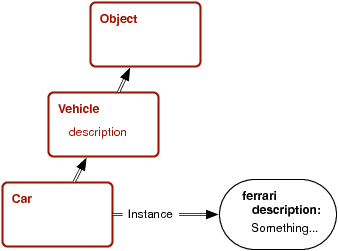
Figure 2. An object-oriented design
Meeting Io is like meeting any language. You’ll have to put in a little keyboard time to get properly acquainted. It will be much easier if we can interact outside of stifled conversations in the hallway before history class. Let’s cut school and skip straight to the good stuff.
Names are sometimes deceiving, but you can tell a lot from Io. It’s simultaneously reckless (ever try Googling for Io?)[6] and brilliant. You get only two letters, both vowels. The language’s syntax is simple and low-level, like the name. Io syntax simply chains messages together, with each message returning an object and each message taking optional parameters in parentheses. In Io, everything is a message that returns another receiver. There are no keywords and only a handful of characters that behave like keywords.
With Io, you won’t worry about both classes and objects. You’ll deal exclusively in objects, cloning them as needed. These clones are called prototypes, and Io is the first and only prototype-based language we’ll look at. In a prototype language, every object is a clone of an existing object rather than a class. Io gets you about as close to object-oriented Lisp as you’re likely to get. It’s too early to tell whether Io will have lasting impact, but the simplicity of the syntax means it has a fighting chance. The concurrency libraries that you’ll see in day 3 are well conceived, and the message semantics are elegant and powerful. Reflection is everywhere.
Let’s crack open the interpreter and start the party. You can find it at http://iolanguage.com. Download it and install it. Open the interpreter by typing io, and enter the traditional “Hello, World” program:
Io> "Hi ho, Io" print
|
|
Hi ho, Io==> Hi ho, Io
|
You can tell exactly what’s going on here. You’re sending the print message to the string "Hi ho, Io". Receivers go on the left, and messages go on the right. You won’t find much syntactic sugar at all. You’ll just send messages to objects.
In Ruby, you created a new object by calling new on some class. You created a new kind of object by defining a class. Io makes no distinction between these two things. You’ll create new objects by cloning existing ones. The existing object is a prototype:
batate$ io
|
|
Io 20090105
|
|
Io> Vehicle := Object clone
|
|
==> Vehicle_0x1003b61f8:
|
|
type = "Vehicle"
|
Object is the root-level object. We send the clone message, which returns a new object. We assign that object to Vehicle. Here, Vehicle is not a class. It’s not a template used to create objects. It is an object, based on the Object prototype. Let’s interact with it:
Io> Vehicle description := "Something to take you places"
|
|
==> Something to take you places
|
Objects have slots. Think of the collection of slots as a hash. You’ll refer to each slot with a key. You can use := to assign something to a slot. If the slot doesn’t exist, Io will create it. You can also use = for assignment. If the slot doesn’t exist, Io throws an exception. We just created a slot called description.
Io> Vehicle description = "Something to take you far away"
|
|
==> Something to take you far away
|
|
Io> Vehicle nonexistingSlot = "This won't work."
|
|
|
|
Exception: Slot nonexistingSlot not found.
|
|
Must define slot using := operator before updating.
|
|
---------
|
|
message 'updateSlot' in 'Command Line' on line 1
|
You can get the value from a slot by sending the slot’s name to the object:
Io> Vehicle description
|
|
==> Something to take you far away
|
In fact, an object is little more than a collection of slots. We can look at the names of all the slots on Vehicle like this:
Io> Vehicle slotNames
|
|
==> list("type", "description")
|
We sent the slotNames method to Vehicle and got a list of slot names back. There are two slots. You’ve seen the description slot, but we also have a type slot. Every object supports type:
Io> Vehicle type
|
|
==> Vehicle
|
|
Io> Object type
|
|
==> Object
|
We’ll get to types in a few paragraphs. For now, know that type represents the kind of object you’re dealing with. Keep in mind that a type is an object, not a class. Here’s what we know so far:
You make objects by cloning other objects.
Objects are collections of slots.
You get a slot’s value by sending the message.
You can already see that Io is simple and fun. But sit back. We’re only scratching the surface. Let’s move on to inheritance.
In this section, we’re going to deal with inheritance. Given a car that’s also a vehicle, think of how you would model a ferrari object that is an instance of a car. In an object-oriented language, you’d do something like Figure 2, An object-oriented design.
|
|
|
Figure 2. An object-oriented design |
Let’s see how you’d solve the same problem in a prototype language. We’re going to need a few extra objects. Let’s create another:
Io> Car := Vehicle clone
|
|
==> Car_0x100473938:
|
|
type = "Car"
|
|
|
|
Io> Car slotNames
|
|
==> list("type")
|
|
Io> Car type
|
|
==> Car
|
In Io-speak, we created a new object called Car by sending the clone message to the Vehicle prototype. Let’s send description to Car:
Io> Car description
|
|
==> Something to take you far away
|
There’s no description slot on Car. Io just forwards the description message to the prototype and finds the slot in Vehicle. It’s dead simple but plenty powerful. Let’s create another car, but this time, we’ll assign it to ferrari:
Io> ferrari := Car clone
|
|
==> Car_0x1004f43d0:
|
|
|
|
Io> ferrari slotNames
|
|
==> list()
|
A-ha! There’s no type slot. By convention, types in Io begin with uppercase letters. Now, when you invoke the type slot, you’ll get the type of your prototype:
Io> ferrari type
|
|
==> Car
|
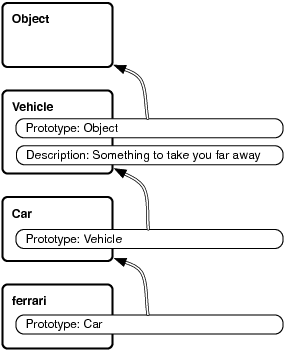
This is how Io’s object model works. Objects are just containers of slots. Get a slot by sending its name to an object. If the slot isn’t there, Io calls the parent. That’s all you have to understand. There are no classes or metaclasses. You don’t have interfaces or modules. You just have objects, like you see in Figure 3, Inheritance in Io.
|
|
Figure 3. Inheritance in Io |
Types in Io are just conveniences. Idiomatically, an object that begins with an uppercase name is a type, so Io sets the type slot. Any clones of that type starting with lowercase letters will simply invoke their parents’ type slot. Types are just tools that help Io programmers better organize code.
If you wanted ferrari to be a type, you would have it begin with an uppercase letter, like this:
Io> Ferrari := Car clone
|
|
==> Ferrari_0x9d085c8:
|
|
type = "Ferrari"
|
|
|
|
Io> Ferrari type
|
|
==> Ferrari
|
|
|
|
Io> Ferrari slotNames
|
|
==> list("type")
|
|
Io> ferrari slotNames
|
|
==> list()
|
|
Io>
|
Notice that ferrari has no type slot, but Ferrari does. We’re using a simple coding convention rather than a full language feature to distinguish between types and instances. In other cases, they behave the same way.
In Ruby and Java, classes are templates used to create objects. For example, bruce = Person.new creates a new person object from the Person class. They are different entities entirely, a class and an object. Not so in Io. bruce := Person clone creates a clone called bruce from the prototype called Person. Both bruce and Person are objects. Person is a type because it has a type slot. In most other respects, Person is identical to bruce. Let’s move on to behavior.
In Io, you can create a method easily, like this:
Io> method("So, you've come for an argument." println)
|
|
==> method(
|
|
"So, you've come for an argument." println
|
|
)
|
A method is an object, just like any other type of object. You can get its type:
Io> method() type
|
|
==> Block
|
Since a method is an object, we can assign it to a slot:
Io> Car drive := method("Vroom" println)
|
|
==> method(
|
|
"Vroom" println
|
|
)
|
If a slot has a method, invoking the slot invokes the method:
Io> ferrari drive
|
|
Vroom
|
|
==> Vroom
|
Believe it or not, you now know the core organizational principles of Io. Think about it. You know the basic syntax. You can define types and objects. You can add data and behavior to an object by assigning contents to its slots. Everything else involves learning the libraries.
Let’s dig a little deeper. You can get the contents of slots, whether they are variables or methods, like this:
Io> ferrari getSlot("drive")
|
|
==> method(
|
|
"Vroom" println
|
|
)
|
getSlot will give you your parent’s slot if the slot doesn’t exist:
Io> ferrari getSlot("type")
|
|
==> Car
|
You can get the prototype of a given object:
Io> ferrari proto
|
|
==> Car_0x100473938:
|
|
drive = method(...)
|
|
type = "Car"
|
|
|
|
Io> Car proto
|
|
==> Vehicle_0x1003b61f8:
|
|
description = "Something to take you far away"
|
|
type = "Vehicle"
|
These were the prototypes that you used to clone ferrari and Car. You also see their custom slots for convenience.
There’s a master namespace called Lobby that contains all the named objects. All of the assignments you’ve done in the console, plus a few more, are on Lobby. You can see it like this:
Io> Lobby
|
|
==> Object_0x1002184e0:
|
|
Car = Car_0x100473938
|
|
Lobby = Object_0x1002184e0
|
|
Protos = Object_0x1002184e0
|
|
Vehicle = Vehicle_0x1003b61f8
|
|
exit = method(...)
|
|
ferrari = Car_0x1004f43d0
|
|
forward = method(...)
|
You see the exit implementation, forward, Protos, and the stuff we defined.
The prototype programming paradigm seems clear enough. These are the basic ground rules:
Every thing is an object.
Every interaction with an object is a message.
You don’t instantiate classes; you clone other objects called prototypes.
Objects remember their prototypes.
Objects have slots.
Slots contain objects, including method objects.
A message returns the value in a slot or invokes the method in a slot.
If an object can’t respond to a message, it sends that message to its prototype.
And that’s most of it. Since you can see or change any slot or any object, you can do some pretty sophisticated metaprogramming. But first, you need to see the next layer of building blocks: collections.
Io has a few types of collections. A list is an ordered collection of objects of any type. List is the prototype for all lists, and Map is the prototype for key-value pairs, like the Ruby hash. Create a list like this:
Io> toDos := list("find my car", "find Continuum Transfunctioner")
|
|
==> list("find my car", "find Continuum Transfunctioner")
|
|
|
|
Io> toDos size
|
|
==> 2
|
|
|
|
Io> toDos append("Find a present")
|
|
==> list("find my car", "find Continuum Transfunctioner", "Find a present")
|
There’s a shortcut way of representing a list. Object supports the list method, which wraps the arguments up into a list. Using list, you can conveniently create a list, like this:
Io> list(1, 2, 3, 4)
|
|
==> list(1, 2, 3, 4)
|
List also has convenience methods for math and to deal with the list as other data types, such as stacks:
Io> list(1, 2, 3, 4) average
|
|
==> 2.5
|
|
Io> list(1, 2, 3, 4) sum
|
|
==> 10
|
|
Io> list(1, 2, 3) at(1)
|
|
==> 2
|
|
Io> list(1, 2, 3) append(4)
|
|
==> list(1, 2, 3, 4)
|
|
Io> list(1, 2, 3) pop
|
|
==> 3
|
|
Io> list(1, 2, 3) prepend(0)
|
|
==> list(0, 1, 2, 3)
|
|
Io> list() isEmpty
|
|
==> true
|
The other major collection class in Io is the Map. Io maps are like Ruby hashes. Since there’s no syntactic sugar, you’ll work with them with an API that looks like this:
Io> elvis := Map clone
|
|
==> Map_0x115f580:
|
|
Io> elvis atPut("home", "Graceland")
|
|
==> Map_0x115f580:
|
|
Io> elvis at("home")
|
|
==> Graceland
|
|
Io> elvis atPut("style", "rock and roll")
|
|
==> Map_0x115f580:
|
|
Io> elvis asObject
|
|
==> Object_0x11c1d90:
|
|
home = "Graceland"
|
|
style = "rock and roll"
|
|
Io> elvis asList
|
|
==> list(list("style", "rock and roll"), list("home", "Graceland"))
|
|
Io> elvis keys
|
|
==> list("style", "home")
|
|
Io> elvis size
|
|
==> 2
|
When you think about it, a hash is a lot like an Io object in structure where the keys are slots that are tied to values. The combination of slots that can be rapidly translated to objects is an interesting one.
Now that you’ve seen the basic collections, you’ll want to use them. We’ll need to introduce control structures, and those will depend on boolean values.
Io’s conditions are pretty similar to those of other object-oriented languages. Here are a few:
Io> 4 < 5
|
|
==> true
|
|
Io> 4 <= 3
|
|
==> false
|
|
Io> true and false
|
|
==> false
|
|
Io> true and true
|
|
==> true
|
|
Io> true or true
|
|
==> true
|
|
Io> true or false
|
|
==> true
|
|
Io> 4 < 5 and 6 > 7
|
|
==> false
|
|
Io> true and 6
|
|
==> true
|
|
Io> true and 0
|
|
==> true
|
That’s simple enough. Make a note: 0 is true as in Ruby, not false as in C. So, what is true?
Io> true proto
|
|
==> Object_0x200490:
|
|
= Object_()
|
|
!= = Object_!=()
|
|
...
|
|
|
|
Io> true clone
|
|
==> true
|
|
Io> false clone
|
|
==> false
|
|
Io> nil clone
|
|
==> nil
|
Now, that’s interesting! true, false, and nil are singletons. Cloning them just returns the singleton value. You can do the same pretty easily. Create your own singleton like this:
Io> Highlander := Object clone
|
|
==> Highlander_0x378920:
|
|
type = "Highlander"
|
|
|
|
Io> Highlander clone := Highlander
|
|
==> Highlander_0x378920:
|
|
clone = Highlander_0x378920
|
|
type = "Highlander"
|
We’ve simply redefined the clone method to return Highlander, rather than letting Io forward requests up the tree, eventually getting to Object. Now, when you use Highlander, you’ll get this behavior:
Io> Highlander clone
|
|
==> Highlander_0x378920:
|
|
clone = Highlander_0x378920
|
|
type = "Highlander"
|
|
Io> fred := Highlander clone
|
|
==> Highlander_0x378920:
|
|
clone = Highlander_0x378920
|
|
type = "Highlander"
|
|
|
|
Io> mike := Highlander clone
|
|
==> Highlander_0x378920:
|
|
clone = Highlander_0x378920
|
|
type = "Highlander"
|
|
|
|
Io> fred == mike
|
|
==> true
|
Two clones are equal. That’s not generally true:
Io> one := Object clone
|
|
==> Object_0x356d00:
|
|
|
|
Io> two := Object clone
|
|
==> Object_0x31eb60:
|
|
|
|
Io> one == two
|
|
==> false
|
Now, there can be only one Highlander. Sometimes, Io can trip you up. This solution is simple and elegant, if a little unexpected. We’ve blasted through a lot of information, but you know enough to do some pretty radical things, such as changing an object’s clone method to make a singleton.
Be careful, though. Love him or hate him, you can’t deny that Io is interesting. As with Ruby, Io can be a love-hate relationship. You can change just about any slot on any object, even the ones that define the language. Here’s one that you may not want to try:
Object clone := "hosed"
|
Since you overrode the clone method on object, nothing can create objects anymore. You can’t fix it. You just have to kill the process. But you can also get some pretty amazing behaviors in a short time. Since you have complete access to operators and the slots that make up any object, you can build domain-specific languages with a few short fascinating lines of code. Before we wrap up the day, let’s hear what the inventor of the language has to say.
Steve Dekorte is an independent consultant in the San Francisco area. He invented Io in 2002. I had the pleasure of interviewing him about his experiences with creating Io.
Why did you write Io?
In 2002, my friend Dru Nelson wrote a language called Cel (inspired by Self) and was asking for feedback on its implementation. I didn’t feel I understood how programming languages work well enough to have anything useful to say, so I started writing a small language to understand them better. It grew into Io.
What is the thing that you like about it the most?
I like the simple and consistent syntax and semantics. They help with understanding what’s going on. You can quickly learn the basics. I have a terrible memory. I constantly forget the syntax and weird semantic rules for C and have to look them up. (ed. Steve implemented Io in C.) That’s one of the things I don’t want to do when I use Io.
For example, you can see the code, such as people select(age > 20)
map(address) println, and get a pretty good idea of what is going on. You’re filtering a list of people based on age, getting their addresses, and printing them out.
If you simplify the semantics enough, things become more flexible. You can start to compose things that you did not understand when you implemented the language. Here’s an example. There are video games that are puzzle games that assume a solution, and there are more games that are open-ended. The open-ended ones are fun because you can do things that the designers of the game never imagined. Io is like that.
Sometimes other languages make syntactic shortcuts. That leads to extra parsing rules. When you program in a language, you need to have the parser in your head. The more complicated a language, the more of the parser you need to have in your head. The more work a parser has to do, the more work you have to do.
What are some limitations of Io?
The cost of Io’s flexibility is that it can be slower for many common uses. That said, it also has certain advantages (such as coroutines, async sockets, and SIMD support), which can also make it much faster than even C apps written with traditional thread per socket concurrency or non-SIMD vector ops.
I’ve also had some complaints that the lack of syntax can make quick visual inspection trickier. I’ve had similar problems with Lisp, so I understand. Extra syntax makes for quick reading. New users sometimes say Io has too little syntax, but they usually warm up to it.
Where is the strangest place you’ve seen Io in production?
Over the years, I’ve heard rumors of Io from place to place like on a satellite, in a router configuration language, and as a scripting language for video games. Pixar uses it too. They wrote a blog entry about it.
It was a busy first day, so it’s time to break for a little bit. You can now pause and put some of what you’ve learned into practice.
You’re now through a good chunk of Io. So far, you know a good deal about the basic character of Io. The prototype language has very simple syntax that you can use to build new basic elements of the language itself. Even core elements lack even the simplest syntactic sugar. In some ways, this minimal approach will make you work a little harder to read the syntax.
A minimal syntax has some benefits as well. Since there is not much going on syntactically, you don’t have to learn any special rules or exceptions to them. Once you know how to read one sentence, you can read them all. Your learning time can go toward establishing your vocabulary.
Your job as a new student is greatly simplified:
Understand a few basic syntactical rules.
Understand messages.
Understand prototypes.
Understand the libraries.
When you’re looking for Io background, searching for answers is going to be a little tougher because Io has so many different meanings. I recommend Googling for Io language.
Find:
Some Io example problems
An Io community that will answer questions
A style guide with Io idioms
Answer:
Evaluate 1 + 1 and then 1 + "one". Is Io strongly typed or weakly typed? Support your answer with code.
Is 0 true or false? What about the empty string? Is nil true or false? Support your answer with code.
How can you tell what slots a prototype supports?
What is the difference between = (equals), := (colon equals), and ::= (colon colon equals)? When would you use each one?
Do:
Run an Io program from a file.
Execute the code in a slot given its name.
Spend a little time playing with slots and prototypes. Make sure you understand how prototypes work.